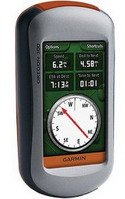
 I have done an extensive evaluation of the Oregon 300. Here are my comments.
The Good:
-Touch screen makes entering and managing waypoints much easier.
-The car navigation screen is much larger and easier to read.
-The topo maps have the ability to be shaded in 3D for better situational awareness.
-The geocaching feature is superb. You have all the notes, logs, and hints right on the GPS while searching for caches. You can even record notes in the field (easy on touch keyboard) and then auto upload [...].
-heart rate monitor and cadence options are available.
-Profiles -finally. You can customize the multitude of displays and options and then effortlessly switch between them depending on your operating environment.
-Screen Capture - cool feature, but not sure I would use it much.
-Image Viewer. Resolution is okay, not great. This could be a useful thing to have though because you could scan a route description or detailed map, and then load it into the GPS for reference.
-Time Zones update automatically, or can be set manually.
-Backgrounds (desktops) can be changed to whatever you want.
-Wireless sharing of waypoints and tracks.
-WhereIGo Player for interactive game cartridges.
-Touch screen user interface is very easy to use and quite intuitive although some frequently used features are buried deep on some pages.
The Bad:
-First and foremost is the poor screen quality in medium light. The screen has almost no reflectivity and therefore under all but the brightest conditions, it is difficult to see without using the backlight at about 75% brightness.
-Because of the screen readability problem described above, and the need to use the backlight in most situations means the battery draw is significant and you can expect to only get about 8-10 hours battery life with normal use. Garmin says 16 but that is likely with backlight at 50% and timing out after 15 sec and using "battery save" which completely powers off the screen until you touch it. The HCx will usually go 25-30 hours by comparison because it almost never needs a backlight.
-There is no welcome screen. You lose it, you better have your name etched onto the back.
-The GPS cannot be used at all when connected to the computer. Also it powers off everytime you disconnect. (The HCx offers the option of staying on.)
-Basemap is not as distinct as on HCx. Water is shown in white and is difficult to discern from the cream colored land. However when in Automobile mode, water shows up blue?? (HCx shows all water in BLUE! Duh)
-No capability to measure distances or project waypoints using the map. (I use this feature frequently on the HCx to determine distance between 2 points, or to set a course.)
-Trip Reset is all or nothing. HCx allowed you to choose what you wanted to reset. On the Oregon everything gets reset (Except the odometer. There is no reset for that unless you restore to factory default.
-Track is only shown in Black. The HCx allowed you to change the color of the track.
-The alarm tone is very quiet and is virtually useless for me. No way to change it. (Also they eliminated the choices for what tone you wanted to hear for upcoming turns. Tones are either on or off.)
-Can't change the speed at which the compass turns off. The default speed is too fast. That means when you are walking at 2-3mph, the map jumps all around because the compass isn't stabilized. (The HCx allows you to change what speed at which the GPS references the satellites for directional info vs. Compass. I have mine set for 0.5 mph. That way it works when I am stopped and the compass is stable.)
-When viewing the Elevation profile, there are only 2 data fields. I usually set them to elev gained and lost. But then ironically, I can't see what altitude I am currently at. (The HCx has 2 fields at the top and always shows either altitude or baro pressure at the bottom.)
-Another major downgrade on the elevation profile feature is that when reviewing a profile there is no way to jump to that point on the map page. (On the HCx as you review a profile, it shows altitude, distance along the track. If you press enter, it takes you to the map page at precisely the point that you were looking at. E.g. When I am looking at the track from Mt. Baker hike, I can see precisely where I stopped to rest. When reviewing the profile, I could go to that spot on the profile hit enter and mark a waypoint at the exact spot we stopped. (Could save your life in a white out.) The Oregon has no such capability. That really sucks.)
-Heart rate displays only your heart rate. No max, no zone timers etc. Furthermore this GPS is NOT compatible with Garmin connect. WTF? Stupid.
-The unit retains the features for Area Calculation and best times for hunting and fishing. Why? I don't know. I have never used either one of those features.
Some general usability issues:
-The device has a rouded back and a metal clip for a carabiner. Problem is if you set it down on this rounded metal back, it will quickly slide off of whatever surface it is on. You could never set this thing down on a rock in the mountains. Your only other option is to set it on its face, but then you risk damaging the touch screen. That raised another issue. If a rock or stick or other sharp pokey thing was to impact or nick the screen, would you end up with a brick when you need it the most? (My HCx was in the lid of my pack when it went tumbling 35 feet down a rocky hillside end over end. I thought the GPS would be toast, but it barely was scratched. How would the Oregon fare in similar circumstances?)
-While the cursor on the HCx isn't as user friendly as a touch screen, it is MUCH more precise. Much easier than the Oregon to select and highlight waypoints on the map.
-Finally, while the user interface is easy to use, the organization of features is poor. All of the set up menus are located in one place which means you have to scroll through 4 pages to reach some of them. E.g the Altimeter set up is the 11th choice on the menu and on page 3.
So if I am viewing the Altitude plot on the Elevation Profile page, and I choose to view Barometric Pressure instead, I have to touch the screen a total of 10 times! (On the HCx, it takes exactly two key presses to do the same thing.) Garmin should have designed the software with CONTEXT sensitive menus that would give you all the options with one key press on the page you are viewing. Furthermore, to change pages you have to return EVERYTIME to the main menu where there are 5 pages of options. For the most part, this means 2 key presses to get you where you want to go. 1 to escape to the main menu, then one to select the next page. However if you select e.g. The Calendar on menu page 5 and then want to go to the map which is on page 1 of the menu, you have to press:
1. Escape
2. Left arrow 4 times
3. Map
That is 6 key presses.
On the HCx, pressing the page key twice will do the same thing.
Sensitivity and Speed
No contest. The HCx has the Oregon receiver beat hands down. Powering both units up simultaneously after they have been moved long distances and have to re-acquire satellites, the HCx beat the Oregon by more than a minute. I have tested both under the canopy of trees, and found the HCx is able to track your course more accurately with that highly sensitive antenna.
Overall, not a bad unit, but it could be so much better. If you mostly use it for driving and Geocaching, this is one of the best GPSs I have used. If you want to use it for more adventurous outdoor adventures, I would stick by the trusty HCx for a little longer and hope Garmin creates a unit with a brighter more energy efficient screen (OLED) and puts back in some of the features left out.
Garmin Oregon 300 Portable GPS System
